import pandas as pd
import numpy as np
import matplotlib.pyplot as plt
import matplotlib.colors as mcolors
import seaborn as sns
from numpy.linalg import cholesky, qr, cond, lstsq, solve
from scipy.optimize import curve_fit
from sage.all import *
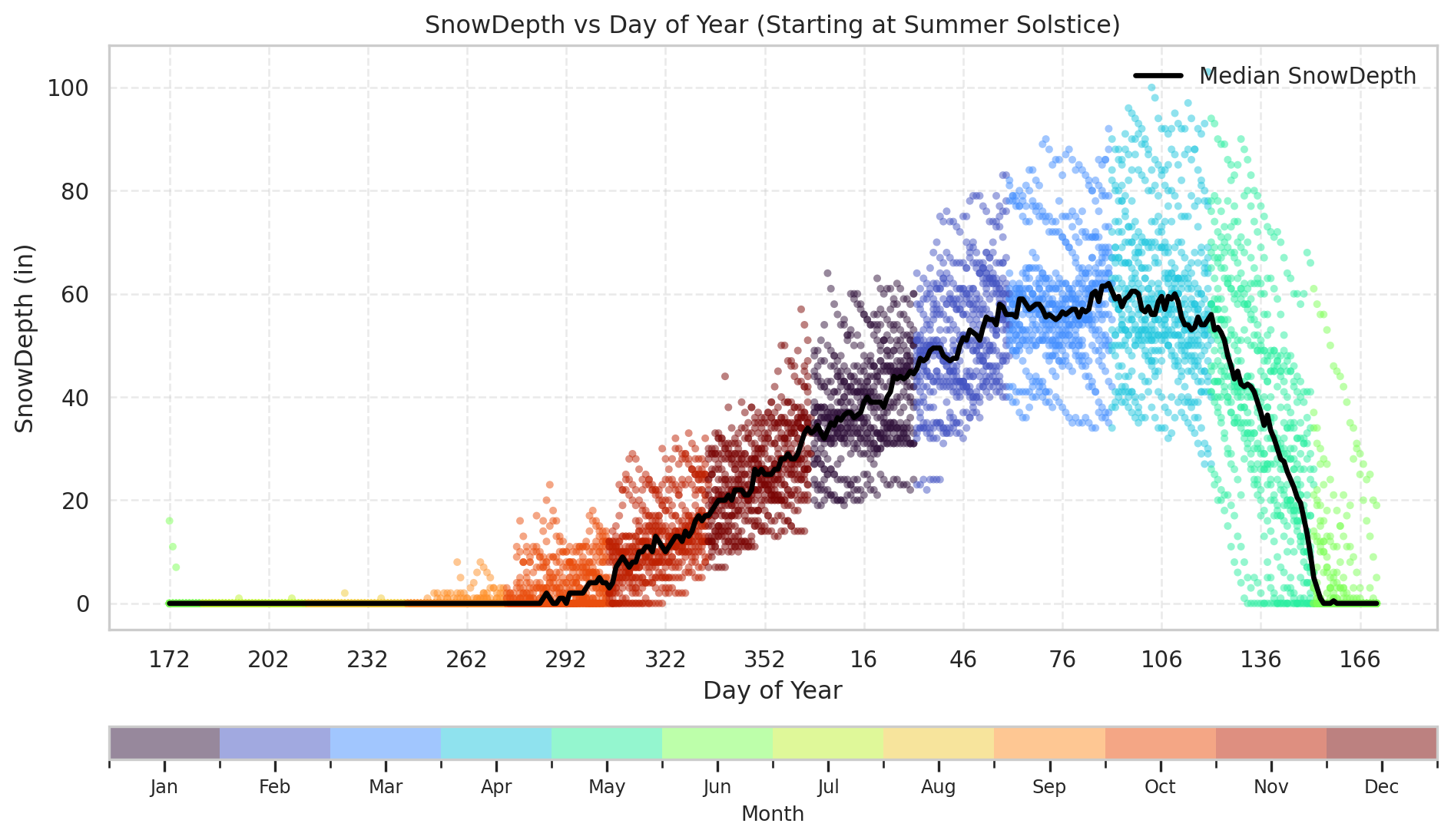
def plot_snowdepth_shifted(df, solstice_day=172, ycol='SnowDepth'):
    """
    Plot snow depth vs. rebased day-of-year (starting at summer solstice),
    including the median snow depth for each day.

    Parameters
    ----------
    df : DataFrame
        Input dataset containing 'Date', 'Month', 'DayOfYear', 'SnowDepth',
        and 'MedianSnowDepth' columns.
    solstice_day : int, optional
        Day-of-year for the summer solstice (default 172).
    ycol : str, optional
        Column name to plot on the y-axis (default 'SnowDepth').

    Returns
    -------
    None
        Displays a scatter plot with median line and month colorbar.
    """

    work = df.copy()
    work['DayShifted'] = (work['DayOfYear'] - solstice_day) % 366
    work = work.sort_values('DayShifted')

    # Discrete colormap by month
    cmap = plt.cm.turbo
    month_colors = cmap(np.linspace(0, 1, 12))
    norm = mcolors.BoundaryNorm(np.arange(1, 14), 12)

    # Plot
    plt.figure(figsize=(10, 6))
    sc = plt.scatter(work['DayShifted'], work[ycol],
                     c=work['Month'],
                     cmap=mcolors.ListedColormap(month_colors),
                     norm=norm,
                     s=14, alpha=0.5, edgecolor='none')

    # Median Line (using precomputed MedianSnowDepth)
    median_by_day = work.groupby('DayShifted')['MedianSnowDepth'].first()
    plt.plot(median_by_day.index, median_by_day.values,
             color='black', linewidth=2.5,
             label='Median {}'.format(ycol))

    # Labels and grid
    plt.xlabel('Day of Year')
    plt.ylabel(ycol + ' (in)')
    plt.title('{} vs Day of Year (Starting at Summer Solstice)'.format(ycol))
    plt.grid(True, linestyle='--', alpha=0.4)
    plt.legend(frameon=False, loc='upper right')

    # Horizontal colorbar for months
    cbar = plt.colorbar(sc, orientation='horizontal', pad=0.12, aspect=40)
    cbar.set_ticks(np.arange(1.5, 13.5))
    cbar.set_ticklabels(['Jan','Feb','Mar','Apr','May','Jun',
                         'Jul','Aug','Sep','Oct','Nov','Dec'])
    cbar.ax.tick_params(labelsize=9)
    cbar.set_label('Month', fontsize=10)

    # X-axis ticks labeled by true day-of-year
    xticks = np.arange(0, 366, 30)
    plt.xticks(xticks, [str(int((solstice_day + x) % 366)) for x in xticks])

    plt.tight_layout()
    plt.show()


def add_period(df, name, start, end, col_prefix=None):

    """
    Add boolean and day-count columns for a named seasonal period.

    Parameters
    ----------
    df : DataFrame
        Input dataset with 'Date' and 'DayOfYear' columns.
    name : str
        Name of the period (e.g., 'Cold', 'Melt').
    start, end : int or str
        Start and end of the period as day-of-year integers or ISO date strings.
    col_prefix : str, optional
        Optional column name prefix override.

    Returns
    -------
    DataFrame
        Original DataFrame with '<prefix>_InPeriod' and '<prefix>_Day' columns.
    """

    prefix = col_prefix or name

    # Absolute date mode
    if isinstance(start, str) and isinstance(end, str):
        start_date = pd.to_datetime(start)
        end_date = pd.to_datetime(end)

        if end_date >= start_date:
            in_period = (df['Date'] >= start_date) & (df['Date'] <= end_date)
            day_val = (df['Date'] - start_date).dt.days
        else:
            in_period = (df['Date'] >= start_date) | (df['Date'] <= end_date)
            day_val = ((df['Date'] - start_date).dt.days) % 365

    # Day-of-year mode
    elif isinstance(start, (int, np.integer)) and isinstance(end, (int, np.integer)):
        # Normalize within [1, 365]
        start = int(start) % 365 or 365
        end = int(end) % 365 or 365

        # Inclusive cyclic logic
        if start <= end:
            in_period = (df['DayOfYear'] >= start) & (df['DayOfYear'] <= end)
            day_val = df['DayOfYear'] - start
        else:
            # Wrap-around case (e.g. 274 -> 90)
            in_period = (df['DayOfYear'] >= start) | (df['DayOfYear'] <= end)
            # Ensure continuous day count across boundary
            day_val = (df['DayOfYear'] - start) % 365
    else:
        raise ValueError("start and end must both be ints (DayOfYear) or both be strings (absolute dates).")

    # Add columns to df
    df[f'{prefix}_InPeriod'] = in_period
    df[f'{prefix}_Day'] = np.where(in_period, day_val, np.nan)

    return df

def get_period_data(df, period_name):

    """
    Extract X and y arrays for a given period.

    Parameters
    ----------
    df : DataFrame
        Dataset with '<Period>_InPeriod' and '<Period>_Day' columns.
    period_name : str
        Period name (e.g., 'Cold', 'Melt').

    Returns
    -------
    tuple
        (X, y, fallback_model) where fallback_model returns NaNs if empty.
    """

    in_col = f"{period_name}_InPeriod"
    day_col = f"{period_name}_Day"

    # Ensure required columns exist
    for col in [in_col, day_col, "SnowDepth"]:
        if col not in df.columns:
            raise KeyError(f"Missing required column '{col}' in DataFrame")

    # Subset valid data
    df_period = df[df[in_col]].dropna(subset=[day_col, "SnowDepth"])

    if df_period.empty:
        print(f"No data found for period '{period_name}'")
        return None, None, lambda x: np.full_like(np.asarray(x), np.nan, dtype=float)

    X = df_period[day_col].values
    y = df_period["SnowDepth"].values

    return X, y, None

def make_line_model(coeffs, X_mean=0.0):
    """
    Create a simple linear model function from coefficients.

    Parameters
    ----------
    coeffs : array_like
        [intercept, slope]
    X_mean : float, optional
        Mean of X used for centering (default 0.0)
    centered : bool, optional
        Whether to subtract X_mean before predicting (default True)

    Returns
    -------
    function
        model(x) -> predicted y
    """
    a, b = coeffs

    return lambda x: a + b * (np.asarray(x, dtype=float) - X_mean)


def plot_period_fits(df, period_name, fit_functions, labels=None,
                     title=None, show_bands=False):
    """
    Seaborn-based plot with a *daily symmetric central-50% band* around each fit:
    for each day-of-period, compute c(day) = median(|residual|) and plot y_fit ± c(day).
    This yields ~half of the data around the fit line for each day.
    """

    in_col, day_col = f"{period_name}_InPeriod", f"{period_name}_Day"
    df_period = df[df[in_col] & df[day_col].notna()].copy()
    if df_period.empty:
        print(f"No data found for period '{period_name}'")
        return {}

    X = df_period[day_col].values
    y = df_period["SnowDepth"].values

    # --- Median & Quartiles (for context background band) ---
    q25 = df_period.groupby(day_col)["SnowDepth"].quantile(0.25)
    q75 = df_period.groupby(day_col)["SnowDepth"].quantile(0.75)
    med  = df_period.groupby(day_col)["SnowDepth"].median()
    median_df = pd.DataFrame({day_col: med.index, "q25": q25.values, "q75": q75.values, "median": med.values})
    X_med, y_med = median_df[day_col].values, median_df["median"].values

    # --- Plot setup ---
    plt.figure(figsize=(8, 5))
    sns.set_theme(style="whitegrid")

    sns.scatterplot(data=df_period, x=day_col, y="SnowDepth",
                    color="gray", alpha=0.25, s=15, label="Daily Data")

    if show_bands:
        plt.fill_between(median_df[day_col], median_df["q25"], median_df["q75"],
                         color="blue", alpha=0.2, label="25–75% Range")

    plt.plot(median_df[day_col], median_df["median"],
             color="black", linewidth=1.5, label="Median Snow Depth")

    # --- Fit lines & metrics ---
    metrics = {}
    x_fit = np.linspace(X.min(), X.max(), 200)

    for i, f in enumerate(fit_functions):
        label = labels[i] if labels and i < len(labels) else f"Model {i+1}"

        y_pred_full = f(X)
        y_pred_med  = f(X_med)
        y_fit       = f(x_fit)

        # --- Metrics ---
        def _metrics(y_true, y_pred):
            ss_res = np.sum((y_true - y_pred) ** 2)
            ss_tot = np.sum((y_true - np.mean(y_true)) ** 2)
            r2  = 1 - ss_res / ss_tot if ss_tot != 0 else np.nan
            rmse = np.sqrt(np.mean((y_true - y_pred) ** 2))
            mae  = np.mean(np.abs(y_true - y_pred))
            return r2, rmse, mae

        r2_full, rmse_full, mae_full = _metrics(y, y_pred_full)
        r2_med,  rmse_med,  mae_med  = _metrics(y_med, y_pred_med)

        metrics[label] = {
            "Full":   {"R2": r2_full, "RMSE": rmse_full, "MAE": mae_full},
            "Median": {"R2": r2_med,  "RMSE": rmse_med,  "MAE": mae_med},
        }

        plt.plot(x_fit, y_fit, lw=2.2, label=f"{label}")

        # --- Daily symmetric central-50% band around the fit ---
        if show_bands:
            df_fit = df_period.copy()
            df_fit["Residual"] = df_fit["SnowDepth"] - f(df_fit[day_col])

            # For each day: c(day) = median(|residual|)
            mad50 = (
                df_fit.assign(abs_res=lambda d: np.abs(d["Residual"]))
                     .groupby(day_col)["abs_res"]
                     .quantile(0.5)  # 50th percentile of |residual|
                     .reset_index()
                     .rename(columns={"abs_res": "c"})
            )

            # Interpolate c(day) over x_fit for smooth band
            c_interp = np.interp(x_fit, mad50[day_col], mad50["c"])

            # Symmetric band: y_fit ± c(day)
            plt.fill_between(
                x_fit, y_fit - c_interp, y_fit + c_interp,
                color="red", alpha=0.25,
                label=None if i > 0 else "Central 50% Around Fit (Daily)"
            )

    plt.xlabel("Day of Period")
    plt.ylabel("Snow Depth (in)")
    plt.title(title or f"{period_name} Period Fits")
    plt.legend(frameon=False, fontsize=8)
    plt.grid(True, linestyle="--", alpha=0.4)
    plt.tight_layout()
    plt.show()

    return metrics

def forward_substitution(L, b):

    """
    Solve L y = b for y, where L is lower-triangular.

    Parameters
    ----------
    L : (n, n) array_like
        Lower-triangular matrix.
    b : (n,) array_like
        Right-hand side vector.

    Returns
    -------
    y : ndarray
        Solution vector satisfying L y = b.
    """
    L = np.asarray(L, dtype=float)
    b = np.asarray(b, dtype=float)
    n = L.shape[0]
    y = np.zeros_like(b)

    for i in range(n):
        y[i] = (b[i] - np.dot(L[i, :i], y[:i])) / L[i, i]
    return y

def backward_substitution(U, y):
    """
    Solve U x = y for x, where U is upper-triangular.

    Parameters
    ----------
    U : (n, n) array_like
        Upper-triangular matrix.
    y : (n,) array_like
        Right-hand side vector.

    Returns
    -------
    x : ndarray
        Solution vector satisfying U x = y.
    """
    U = np.asarray(U, dtype=float)
    y = np.asarray(y, dtype=float)
    n = U.shape[0]
    x = np.zeros_like(y)

    for i in range(n - 1, -1, -1):
        x[i] = (y[i] - np.dot(U[i, i + 1:], x[i + 1:])) / U[i, i]
    return x
# Load Data Set
df = pd.read_csv('data/combined_snowdepth.csv', parse_dates=['Date'])
df['Month'] = df['Date'].dt.month
df['Year']  = df['Date'].dt.year
df['DayOfYear'] = df['Date'].dt.dayofyear

# Compute median snow depth by day of year
median_by_day = df.groupby('DayOfYear')['SnowDepth'].median().rename('MedianSnowDepth')
df = df.merge(median_by_day, on='DayOfYear', how='left')

plot_snowdepth_shifted(df)
# By day-of-year
df = add_period(df, 'Cold', 274, 85)
df = add_period(df, 'Melt', 86, 165)
def build_normal_equations(df, period_name, center=True):

    # Get data
    X, y, empty_model = get_period_data(df, period_name)

    # Convert to numeric arrays
    X = np.asarray(X, dtype=float).ravel()
    y = np.asarray(y, dtype=float).ravel()

    # Center
    X_mean = np.mean(X) if center else 0.0
    x = X - X_mean

    # Linear design matrix: [1, x]
    A = np.column_stack((np.ones_like(x), x))

    # Normal equations
    ATA = A.T @ A
    ATy = A.T @ y

    return ATA, ATy, X_mean, A, y
def solve_cholesky(df, period_name, centered=True):
    # Build normal equations
    ATA, ATy, X_mean, A, y = build_normal_equations(df, period_name, center=centered)
    if ATA is None:
        return np.array([np.nan, np.nan]), np.nan, np.nan

    cond_number = cond(ATA)

    # Cholesky decomposition
    L = cholesky(ATA)

    # Solve via substitution
    y_temp = forward_substitution(L, ATy)
    coeffs = backward_substitution(L.T, y_temp)

    return coeffs, cond_number, X_mean
def solve_qr(df, period_name, centered=True):

    # Build normal equations (gets design matrix + mean)
    ATA, ATy, X_mean, A, y = build_normal_equations(df, period_name, center=centered)
    if ATA is None:
        return np.array([np.nan, np.nan]), np.nan, np.nan

    # QR decomposition (A = Q R)
    Q, R = np.linalg.qr(A)

    # Solve R β = Qᵀ y
    Qt_y = Q.T @ y
    coeffs = backward_substitution(R, Qt_y)

    # Condition number from R
    cond_number = np.linalg.cond(R)

    return coeffs, cond_number, X_mean
def solve_lstsq(df, period_name, centered=True):

    # Build design matrix and vectors
    ATA, ATy, X_mean, A, y = build_normal_equations(df, period_name, center=centered)

    # Solve using NumPy's least-squares
    coeffs, _, _, _ = lstsq(A, y, rcond=None)

    # Compute condition number
    cond_number = np.linalg.cond(A)

    return coeffs, cond_number, X_mean
# Build predictor functions
f_chol = make_line_model(chol_coeffs, chol_mean)
f_qr   = make_line_model(qr_coeffs, qr_mean)
f_ls   = make_line_model(lstsq_coeffs, lstsq_mean)

# Plot all together
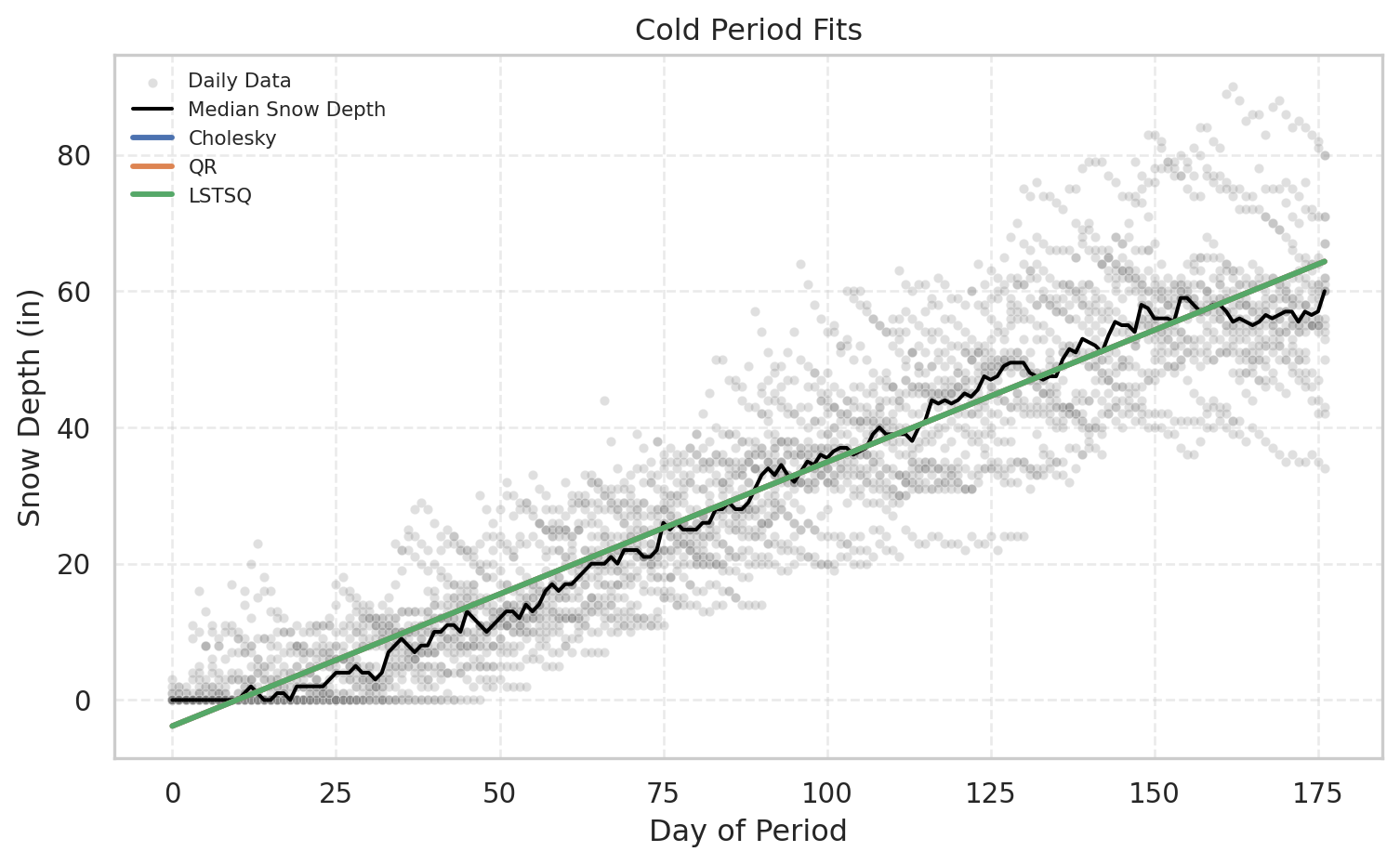
m = plot_period_fits(df, "Cold", [f_chol, f_qr, f_ls], ["Cholesky", "QR", "LSTSQ"])
def make_polyfit_model(df, period_name, degree=2):

    # Get X and y
    X, y, empty_model = get_period_data(df, period_name)

    # Fit polynomial
    coeffs = np.polyfit(X, y, degree)

    # Predictor function
    model = lambda x_new: np.polyval(coeffs, np.asarray(x_new, dtype=float))

    return model
# Fit the linear model for melt
melt_coeffs, _, melt_mean = solve_lstsq(df, 'Cold')
f_lin_melt = make_line_model(melt_coeffs, melt_mean)
# Fit polynomial model for melt
f_poly_melt = make_polyfit_model(df, "Melt", degree=3)

# Plot
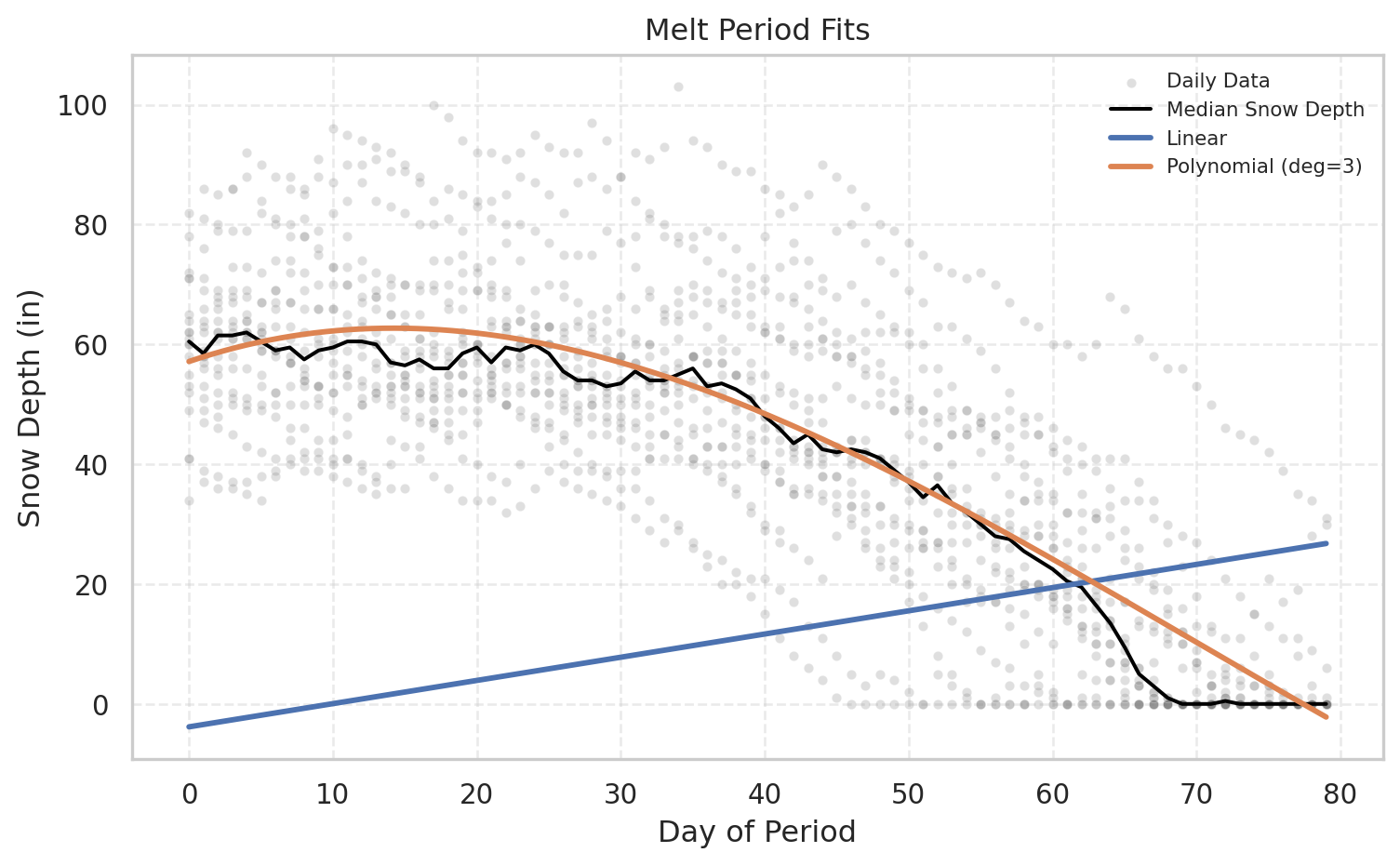
melt_poly_metrics = plot_period_fits(df, "Melt", [f_lin_melt,f_poly_melt], ["Linear", "Polynomial (deg=3)"])
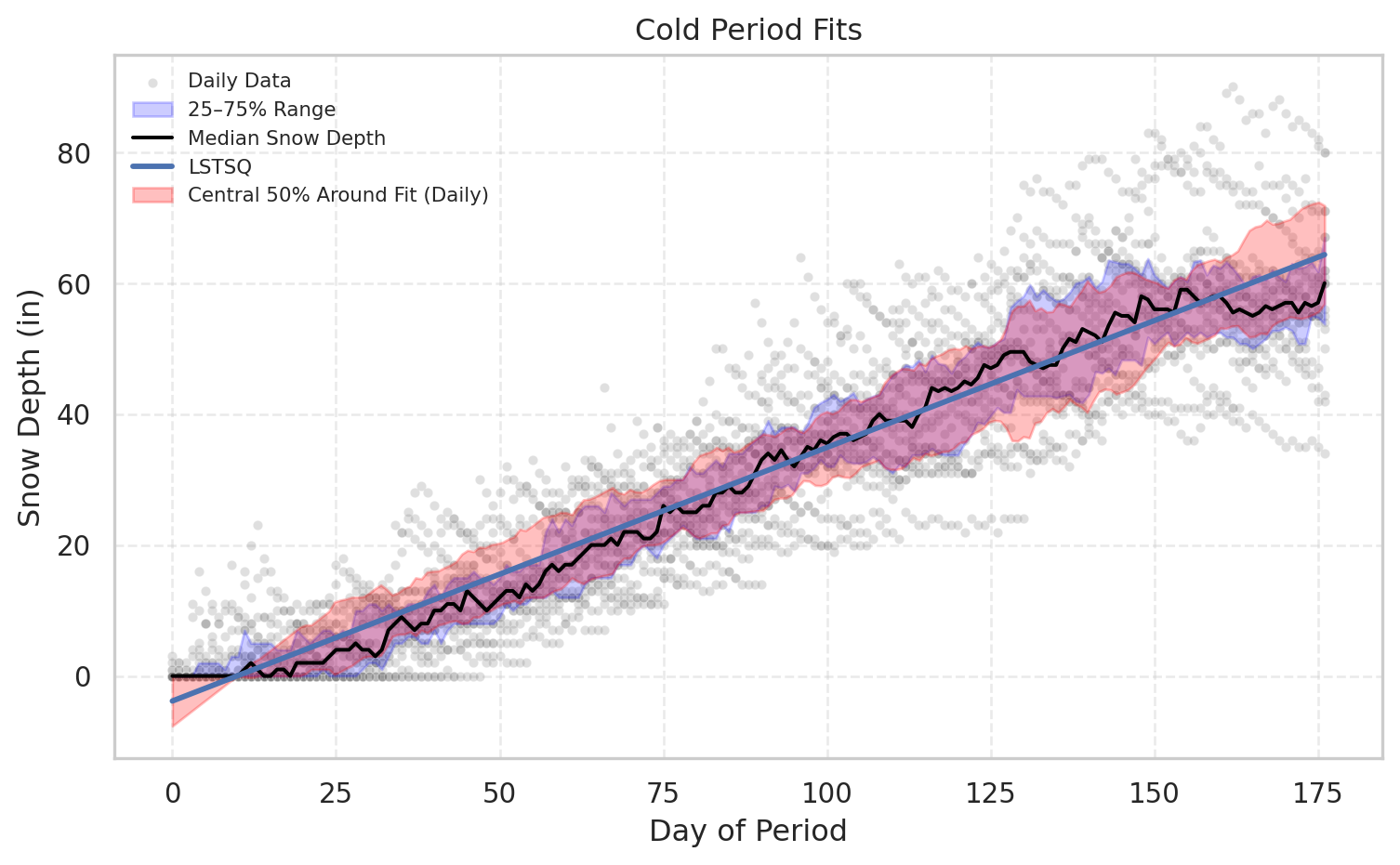
cold_metrics=plot_period_fits(df, "Cold", [f_ls], ["LSTSQ"], show_bands=True)
pd.concat({k: pd.DataFrame(v) for k, v in cold_metrics.items()}, axis=1).round(3)
#| echo: False
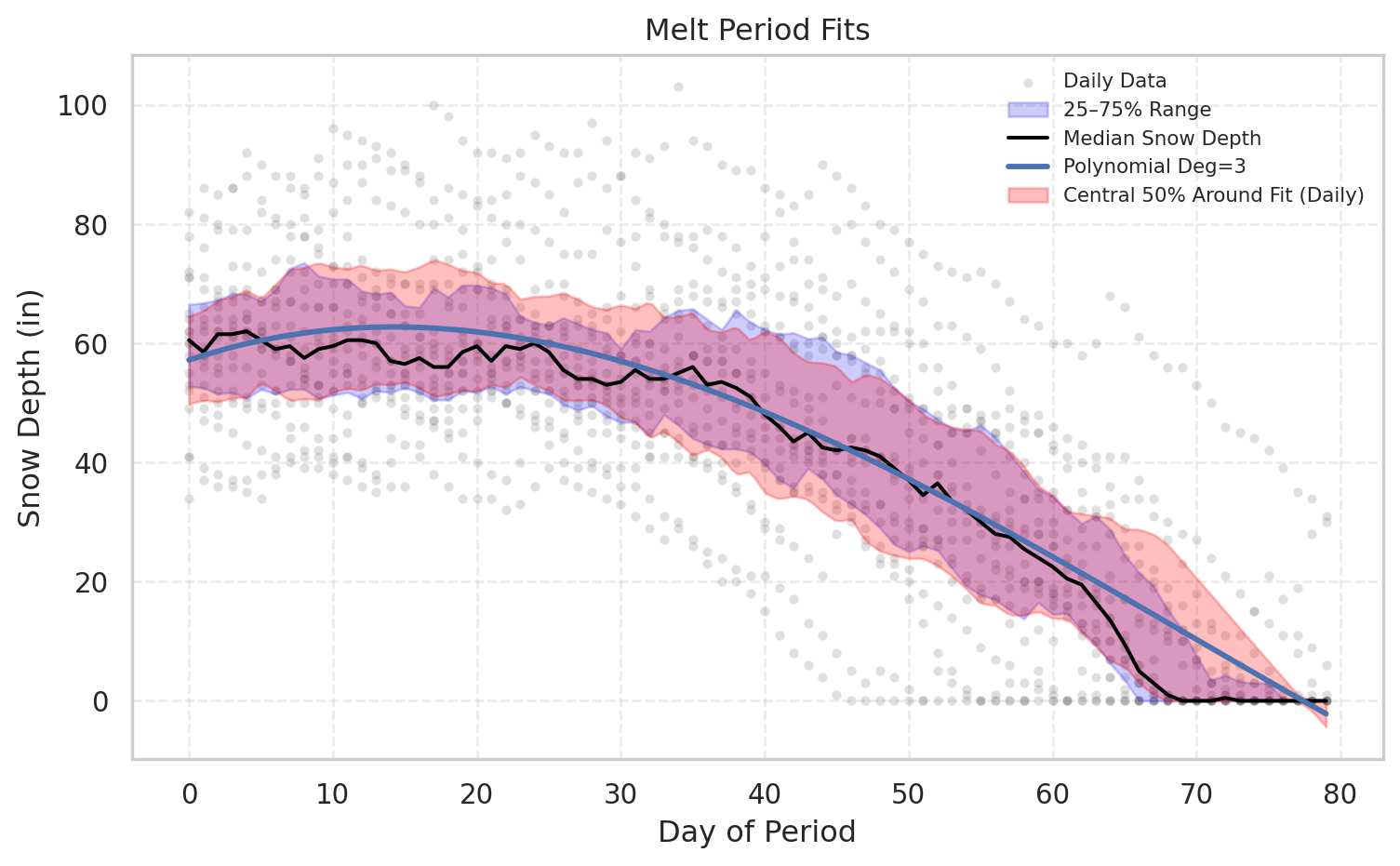
melt_metrics=plot_period_fits(df, "Melt", [f_poly_melt], ["Polynomial Deg=3"], show_bands=True)
#import pandas as pd
pd.concat({k: pd.DataFrame(v) for k, v in melt_metrics.items()}, axis=1).round(3)